Agentic workflow automation lets an AI agent choose some of the steps in a business process. It is most useful where the next action depends on interpreting new information: finding a missing record, resolving a contradiction, or deciding which question to ask. Predictable operations can remain in ordinary application code.
The value is in completing work that otherwise requires someone to move between systems and interpret what they find. A sales team might need to find a suitable product before a customer's deadline; an IT team might need to work out why an employee cannot access an application. Each needs a useful answer or completed action, not another summary to investigate.
What Is Agentic Workflow Automation?
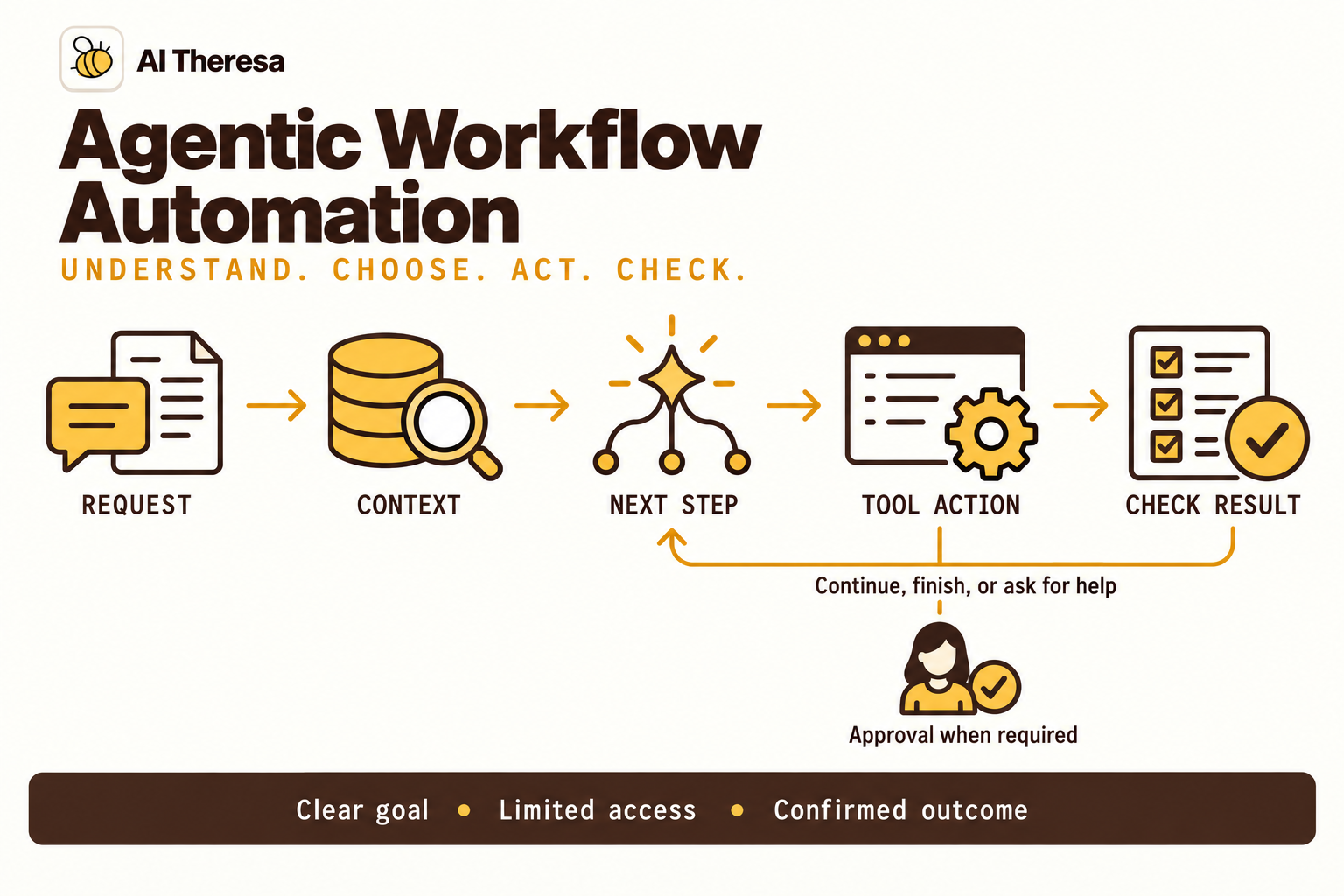
Agentic workflow automation combines a business process with model-directed action selection. The agent observes information, selects a permitted operation, receives its result, and decides how to continue. A surrounding workflow can define when that investigation begins and what happens to its output.
The term "workflow" does not mean every step must be selected by a model. Anthropic's guide to workflows and agents distinguishes predefined execution paths from model-directed processes. Here, an agentic workflow is a larger process that contains some of the latter.
| Approach | What determines the path | Suitable kind of work |
|---|---|---|
| Rules-based automation | Explicit conditions and operations | A known transformation or transaction |
| AI-assisted workflow | Code assigns language tasks in a fixed sequence | Extracting, classifying, or drafting from supplied material |
| Agentic workflow | The model selects some steps using observations | Tasks where new findings determine the next step |
A conditional branch is not evidence of agentic behavior. Code can route a missing field to a reviewer without a model choosing anything. Conversely, an agent can make a useful search decision inside a tightly bounded process with no permission to submit the final result.
A fixed path has known operations to test. An adaptive investigation also needs evaluation of its choices across different cases, including whether it recognizes when the available information is insufficient. Those extra searches and evaluations add to its cost.
Get Started with Theresa for FREEHow Does Agentic Workflow Automation Work?
In this hypothetical sales workflow, a customer wants a table in a walnut finish for an event in two weeks. They have selected a model and size but have not ordered. The agent needs to check whether that choice can arrive in time and explain any available alternative.
Establish the task and its context
The application links the conversation to the selected model and records the requested size, finish, delivery address, and deadline. The agent can check the store's production schedule, finished stock, product specifications, and delivery slots. It can propose another option, but changing the finish requires the customer's agreement.
The store's production schedule shows a four-week lead time for the walnut version, before delivery. That cannot meet the event date. The agent chooses to inspect finished stock for the same model and size, looking for an option the customer could consider without waiting for production.
Use each result to decide the next step
The stock lookup finds one table in oak. The agent checks its specifications: the model and dimensions match, but the finish differs. It then checks the store's delivery schedule for the customer's address and finds an available slot next Thursday, before the event. The price and delivery charge are included in the proposal.
The model chooses these checks from the available tools, using each result to decide what to investigate next. The application executes the requests and returns the store's records. If walnut stock had been available, there would be no reason to propose a different finish. If the customer requires walnut, the oak option is unsuitable.
| Observation in this example | Next action the agent selects | What that action establishes |
|---|---|---|
| Walnut production takes four weeks; the event is in two | Check finished stock for the same model and size | Whether production can be avoided |
| A stocked table is listed in oak | Compare its specifications with the request | The model and size match; the finish differs |
| Oak is a possible alternative | Check delivery availability and price | A Thursday slot is available at the quoted terms |
| The alternative can arrive before the event | Explain the finish difference and ask the customer | Whether oak is acceptable before starting the order |
This sequence could also be programmed as fixed rules. It is agentic when the model selects the follow-ups; the mere presence of several tool calls does not establish that distinction.
Return a result someone can use
The agent can now answer:
The walnut version takes four weeks to make, so it won't be ready for your event. We have the same model and size in oak, with delivery available next Thursday. Would the oak finish work for you?
If the customer accepts the oak option and quoted terms, the ordering system rechecks and reserves the stock and delivery slot. It completes the normal checkout steps before confirming the order. The customer buys one agreed item; the agent does not silently substitute a different finish.
If oak is unacceptable, the agent can investigate another model with permission or explain that the requested table cannot meet the deadline. Finding stock alone does not resolve every customer constraint.
Get Started with Theresa for FREEKey Components of Agentic Workflow Automation
A model with a defined assignment
The model interprets the request and proposes next steps. Its assignment needs a clear finish: a sourced recommendation, a resolved request, or a specific question for someone who can help. Instructions should identify the evidence needed before claiming that result.
Fluent replies alone are a poor measure of success. Evaluation should check whether the agent understood the requirements and completed the task accurately.
Sources and tools
Sources supply information; tools let the agent retrieve records or perform operations. A tool needs clear inputs and results so the model can use it correctly. An inventory lookup, for example, should return the exact product variant and when availability was checked.
Tools that change records should report the resulting status. An order reference should distinguish a reservation from a confirmed purchase, so the reply describes what actually happened.
State and orchestration
State records the work already performed and what remains, including retrieved records and decisions awaiting a reply. The orchestrator is the application code that coordinates model calls and tools, passing each result to the next step.
LangGraph calls a saved snapshot of one workflow's progress a checkpoint. Its stores can hold information shared across separate workflows. A checkpoint preserves a task awaiting a decision; a store might hold preferences used in later conversations.
Saving only in the running program's memory loses progress when that program stops. A workflow waiting overnight needs a database or another store that survives the restart. Searches of saved information must still respect the next user's access.
Review and operational evidence
The review interface should show the proposed action and the evidence supporting it. Execution records should reveal which checks ran and which operations succeeded. These records help a team locate a failure: the source returned old data, the model selected the wrong tool, or the destination rejected the update.
Logs and saved state need access limits and retention periods that preserve enough evidence to investigate failures without keeping confidential material indefinitely.
Get Started with Theresa for FREETypes of Agentic Workflows
Agentic workflow automation can combine several structures. The shape describes how work moves; it becomes agentic where a model chooses what happens next. LangGraph's workflow and agent guide explains this distinction.
Sequential workflows
A sequential workflow passes each stage's result to the next: gather documents, extract relevant details, then prepare a report. It suits work where later steps depend on earlier outputs. An individual stage can contain an agent that investigates before returning its result.
A straight sequence is one form of a directed acyclic graph, or DAG. A DAG can also branch and run tasks in parallel; its defining feature is that paths do not loop back.
Conditional and branching workflows
A decision selects which path to follow. A customer request might go to billing or technical support, each with different tools and information. Rules can handle known conditions; a model can interpret the request to select an appropriate route. Branching alone does not establish agentic behavior.
Parallel workflows
Independent tasks run simultaneously, then their findings are combined. This is often called fan-out and fan-in. Investigations of several suppliers can run in parallel before producing one comparison.
Each task needs its inputs before it starts. Combining results requires checking for conflicting assumptions and unfinished work. A shorter wait does not necessarily mean lower model costs.
Iterative workflows
Results determine whether to repeat a step, change approach, or finish. A coding agent might test a proposed fix, inspect a failure, revise the code, and test again.
Review and revision are activities within this loop. Anthropic's evaluator-optimizer pattern uses evaluation feedback to guide another attempt. Set a stopping condition and an attempt limit; repeated agreement between models does not prove correctness.
Coordinated agent teams
A lead agent can divide a task among specialists and combine their findings, choosing new assignments as questions emerge. Other teams pass work between agents with different responsibilities.
Teams describe who does the work, so they can use sequential, parallel, or iterative structures. Each agent needs a clear assignment and output. Use several agents when the division helps; coordination adds work of its own.
Get Started with Theresa for FREEAgentic Workflow Automation Architecture
The architecture connects a model's proposed action to the systems that can carry it out. Choosing, authorizing, and executing an action are separate responsibilities, even when a platform packages them together.
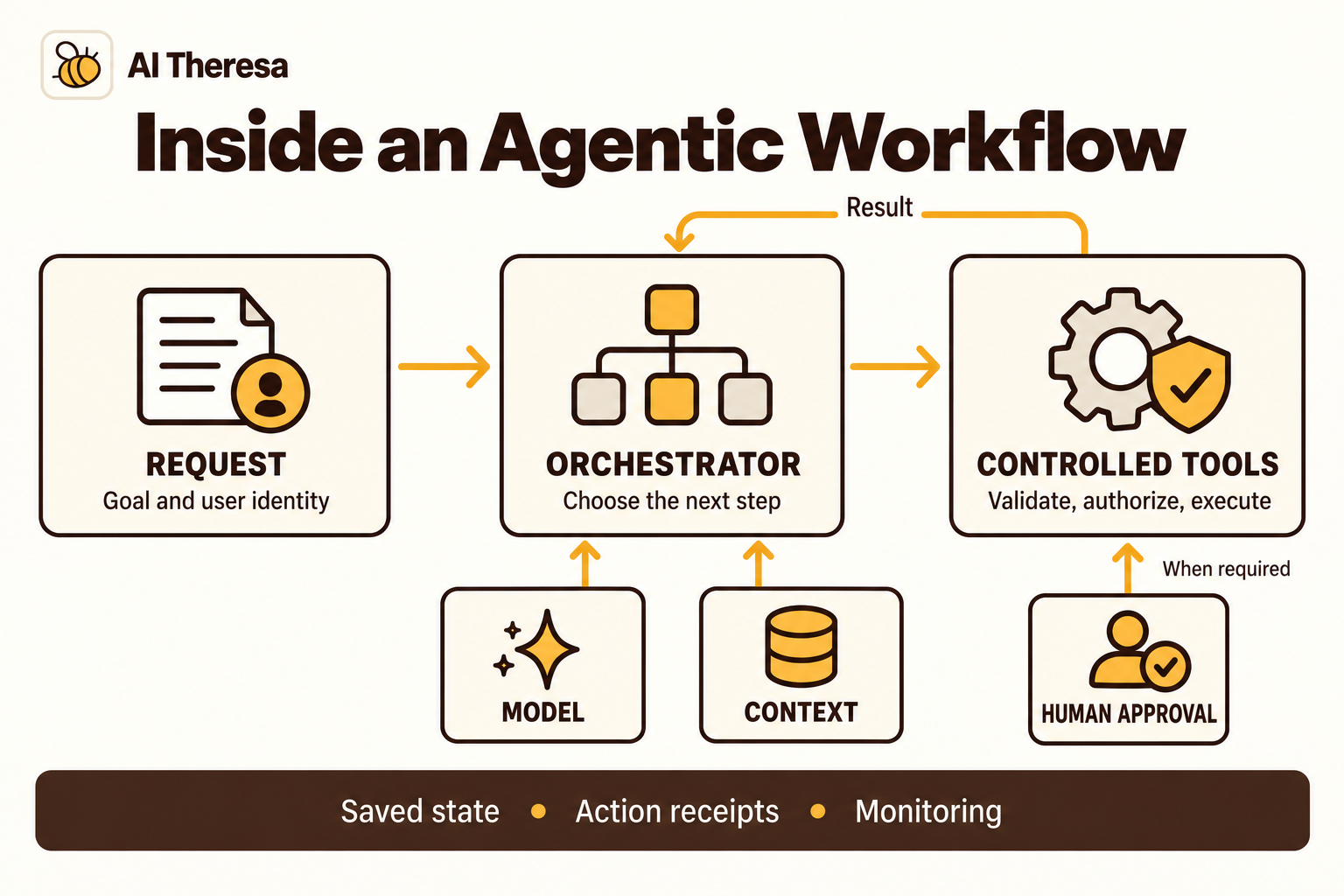
Follow one request through the system
The entry service creates a session for the buying request and checks identity before accessing private customer records. The orchestrator passes the selected product, requirements, and permitted tools to the model, which may request the production lead time.
The tool service checks access, queries the store's production system, and returns the current lead time. Passwords and access keys stay in that service. The model can request information without receiving the production system's credentials.
The orchestrator records the result and asks the model for the next step. Stock, specifications, and delivery checks use separate tools. The application checks the customer's accepted item and terms before allowing a reservation, then handles checkout through the store's ordering system.
Preserve decisions across pauses
A pause separates a running process from a continuing task. The worker can stop while the oak-table proposal waits for the customer's decision. When the customer replies, the application loads that proposal and checks whether its stock and delivery terms still hold.
Approval should refer to a particular proposal. Agreement to buy walnut does not authorize oak, even if the dimensions and price match. A changed delivery date or added fee also needs a fresh decision before the application proceeds.
Sometimes an ordering system accepts a request, but the connection drops before confirmation arrives. Before retrying, the workflow should check the original request's status and use the ordering system's duplicate-prevention mechanism. This reduces the risk of creating a second purchase.
Tools and platforms to evaluate
Choose the platform according to what the team already operates and which parts of the workflow it needs to build. A framework, an automation product, and an enterprise data platform cover different amounts of the implementation.
| Tool or platform | Documented contribution | Work that still needs evaluation |
|---|---|---|
| LangGraph | Code for coordinating workflows and agents with saved progress | Storage, tool interfaces, pauses, and operational support |
| n8n | Connected workflows with agents, model providers, tools, and memory | Connector behavior, workflow boundaries, and handling failed operations |
| Microsoft Copilot Studio | Generative orchestration across configured tools, knowledge, topics, and agents | Available features, connection identities, and fit with the business process |
| Palantir AIP | Agents and automations using connected business data and actions, with platform controls | Source mappings, business objects, actions, and application design |
Existing workflows need not be replaced wholesale. One can call an agent for a bounded investigation and accept a structured result. That preserves working transactions while allowing the team to assess where adaptive behavior adds value.
A trial should also expose maintenance work: changing a tool, investigating a failed lookup, or resuming a paused task. The time needed for those jobs belongs in the cost comparison alongside software and model charges.
Get Started with Theresa for FREEBenefits of Agentic Workflow Automation
Agentic workflows can reduce the time staff spend gathering information before they can act. An agent can follow a reference, resolve a missing detail, and bring the findings together for a decision. People spend less time collecting records and more time assessing the result.
Saved investigations also make handovers easier. When specialist help is needed, the next person receives the request, checks already completed, and unresolved question. They can continue the work without asking the requester to repeat it.
Keeping standard requests in a fixed process limits model usage and makes common cases easier to test. The agent can spend its effort on exceptions that need investigation.
The cost is variable execution: difficult requests may require many lookups and staff intervention. Measure cost per successfully completed task, including model charges and human corrections. Also track how often cases reopen. Faster initial replies offer little benefit if someone still has to redo the work.
Get Started with Theresa for FREEAgentic Workflow Automation Examples
Meeting follow-up at Theresa
At Theresa, an internal workflow turns Zoom meeting summaries into GitHub issues and coordinates assignments with designated team members through Slack. The agent identifies actionable commitments relevant to each repository. Work belonging to another repository is kept out, and it checks earlier action items before creating issues to avoid duplicate tasks.
These checks require interpreting the meeting's commitments in the context of the repository and existing work. The workflow also reports back when an issue closes and provides updates on what has been merged and released. Those updates distinguish task closure from code being merged or released, so the team can follow the work beyond the meeting summary.
Dynamic tool selection in Copilot Studio
An employee says, "I can sign in, but I can't open the sales dashboard I need for today's meeting." In this hypothetical IT workflow, the agent asks which dashboard, checks the service status, and retrieves the employee's access record. The service is healthy, but the employee is missing its access group after a team transfer.
That finding directs the agent to the access policy and approval record rather than password-reset instructions. It finds approval for this dashboard and invokes a configured access workflow. That workflow validates the approval and adds the required group membership. After a fresh access check succeeds, the agent provides the dashboard link and confirms that access has been restored. The ticket records the change and the checks used to verify it.
This application would need the company's service-status, identity, approval, and access tools connected. Microsoft documents the generative orchestration mechanism for choosing configured tools and knowledge sources, asking for missing inputs, and responding from their results. Classic orchestration uses configured topics and explicit tool calls. Builders can inspect the selected steps in the activity map.
Get Started with Theresa for FREEHow to Implement Agentic Workflow Automation
Choose a first outcome and compare it with current work
Choose a recurring task with a clear endpoint and accessible records. Collect completed cases and watch how staff handle them, including the searches and follow-up questions that are missing from the written procedure.
Agree on what completion means. A supplier comparison needs supporting quotes; an access request needs a successful access check. Compare the agent with the current process or a simpler fixed workflow, counting the review and correction work each requires.
Assign discretion where it helps
Let the model choose which information to investigate. Keep access checks and transaction rules in application code. Document what each tool receives and returns before joining the tools into a loop.
Test integrations independently. An inventory connection that returns yesterday's stock can make a capable model offer an item already sold. Check record identifiers and timestamps before spending time on prompt changes.
Evaluate answers and the path taken
Build a test set with routine cases and difficult exceptions. For the furniture workflow, include unavailable finishes, similar product names, rejected alternatives, and missed deadlines. Review the answer alongside the records and tool results that support it.
Check both correctness and access. A plausible answer may use information the requester should not see; permitted records may still be out of date. Repeat important cases to understand variation.
Record meaningful failures and rerun them after changes to models, prompts, or tools. Keep additional cases aside to check whether an improvement works beyond examples used during development.
Treat external content as evidence
A customer message or retrieved record may contain instructions attempting to redirect the agent. OWASP's prompt injection guidance describes this risk and recommends measures such as constrained privileges and human approval for consequential actions.
The application should determine which records and tools are available. Text in a product description must not grant access to another customer's order or bypass purchase confirmation. Test whether malicious content can induce those actions. A prompt telling the model to ignore such instructions is only one layer of protection.
Pilot the review and recovery process
Start with recommendations for a small team before enabling changes to business records. Let staff inspect the evidence, correct a proposal, or request further investigation. Show unresolved requirements without forcing them to read every execution log.
Test a restart while waiting for a decision and a timeout after submitting an action. Confirm what the user sees afterward and who handles a stuck run. Set limits on repeated lookups, runtime, and spending so a difficult request cannot consume an open-ended budget.
Expand when the pilot shows lower total effort at acceptable quality. If integrating the systems exceeds the team's capacity, forward-deployed engineering as a service is one way to obtain implementation help. Define the handover around working integrations, evaluation cases, and operations your team can maintain.
Get Started with Theresa for FREEConclusion
Agentic workflow automation is worth considering when staff must investigate before they can complete a task. Give the agent access to the information and tools that investigation requires, with a clear definition of a finished result.
Start with one recurring request and compare it with the way the team works today. Keep routine steps on their existing path. Expand when the agent helps people finish work accurately with less total effort.