AI code debugging is the use of AI models to explain errors, find their causes, and propose or apply fixes. A chat assistant can explain a stack trace. A coding agent can edit files and rerun the tests until they pass. In Stack Overflow's 2026 developer survey, 63.8% of respondents said they use AI for debugging, troubleshooting, or refactoring.
The tools work best when a bug can be reproduced and checked. A clear error and a failing test give the AI a target and a way to confirm the result. With a vague symptom and no way to trigger it, the AI is guessing. Its answer will not tell you that.
What Is AI Code Debugging?
AI code debugging means using a language model to work out why code misbehaves and how to correct it. A developer, or an agent acting for one, supplies evidence such as the error message, the code involved, and steps to reproduce the problem. The model suggests a cause and a change.
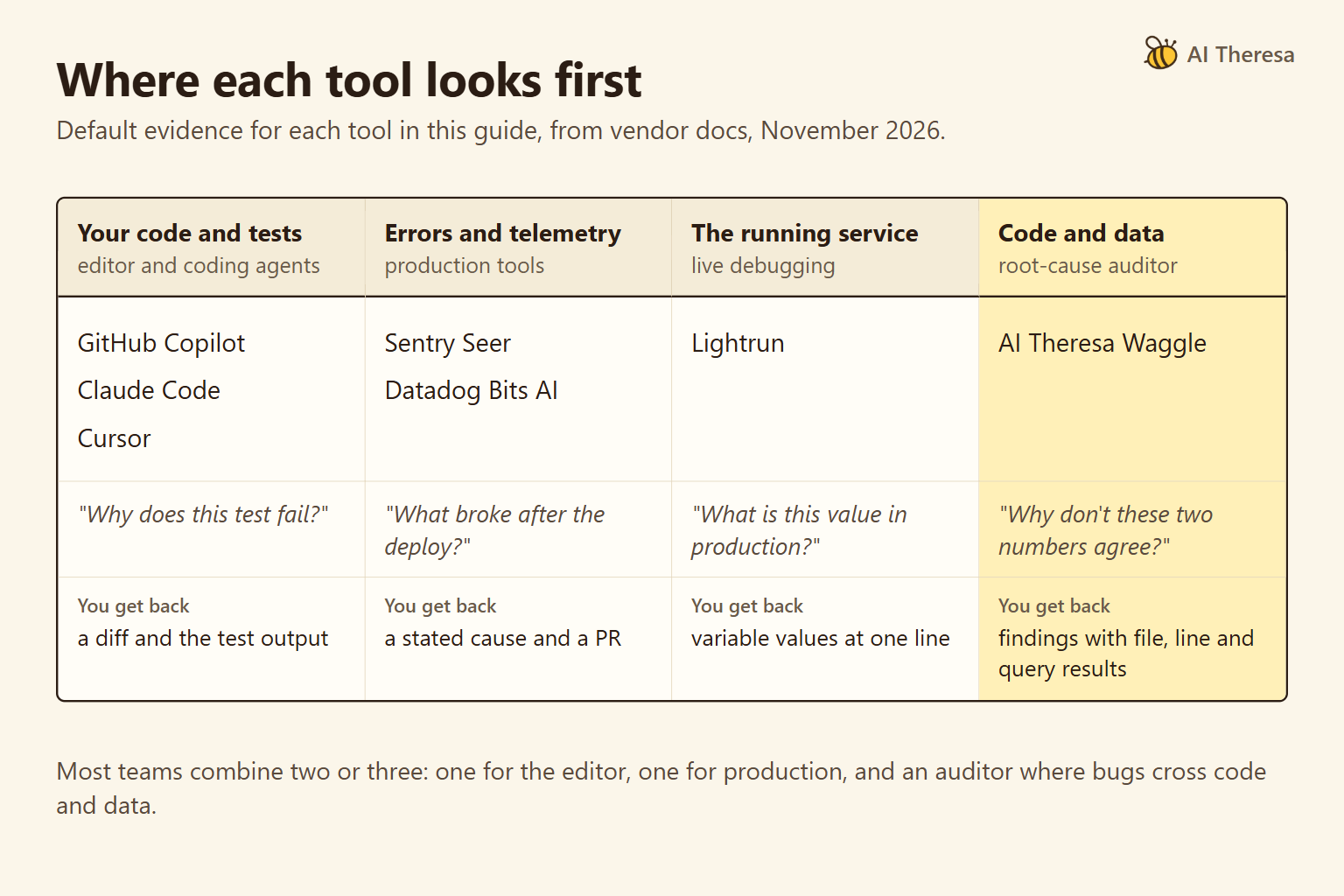
There are four kinds of tool. A chat assistant explains an error pasted into it. An editor command, such as GitHub Copilot's /fix, proposes a change to the selected code. A coding agent reads the project, edits files, and runs commands. An auditor investigates a whole codebase without changing it.
The biggest difference between them is whether the tool can run a check. A model that only reads pasted text can explain and suggest. An agent that can run the failing test can find out whether its suggestion worked. Our AI agent vs LLM guide explains that difference in more detail.
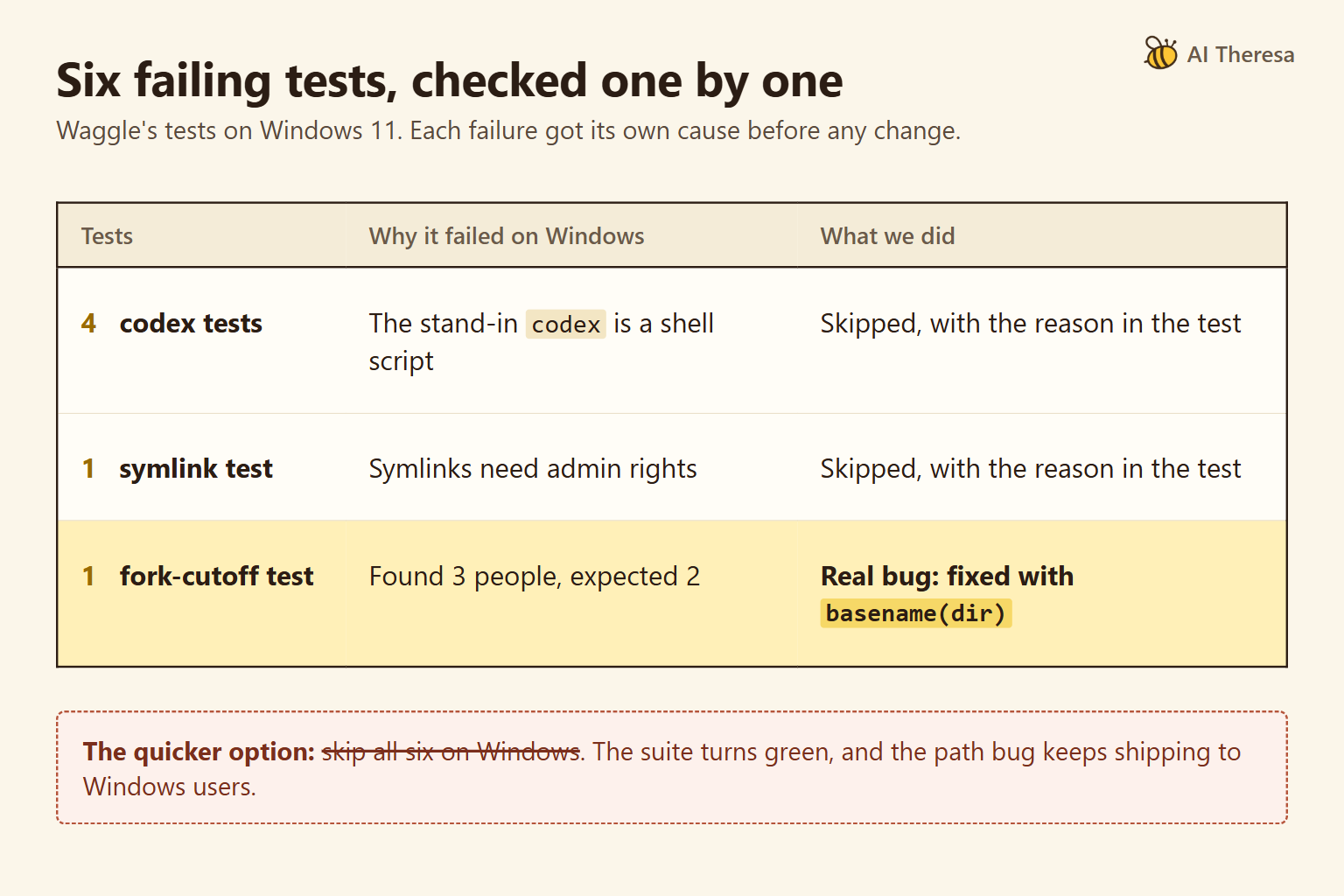
We use one real bug throughout this guide. Six tests in Waggle, our open-source code auditor, failed on Windows while the same tests passed on Linux. Five failures came from the test setup. The sixth was a genuine bug that the quickest fix would have hidden.
Get Started with Theresa for FREEHow Does AI Code Debugging Work?
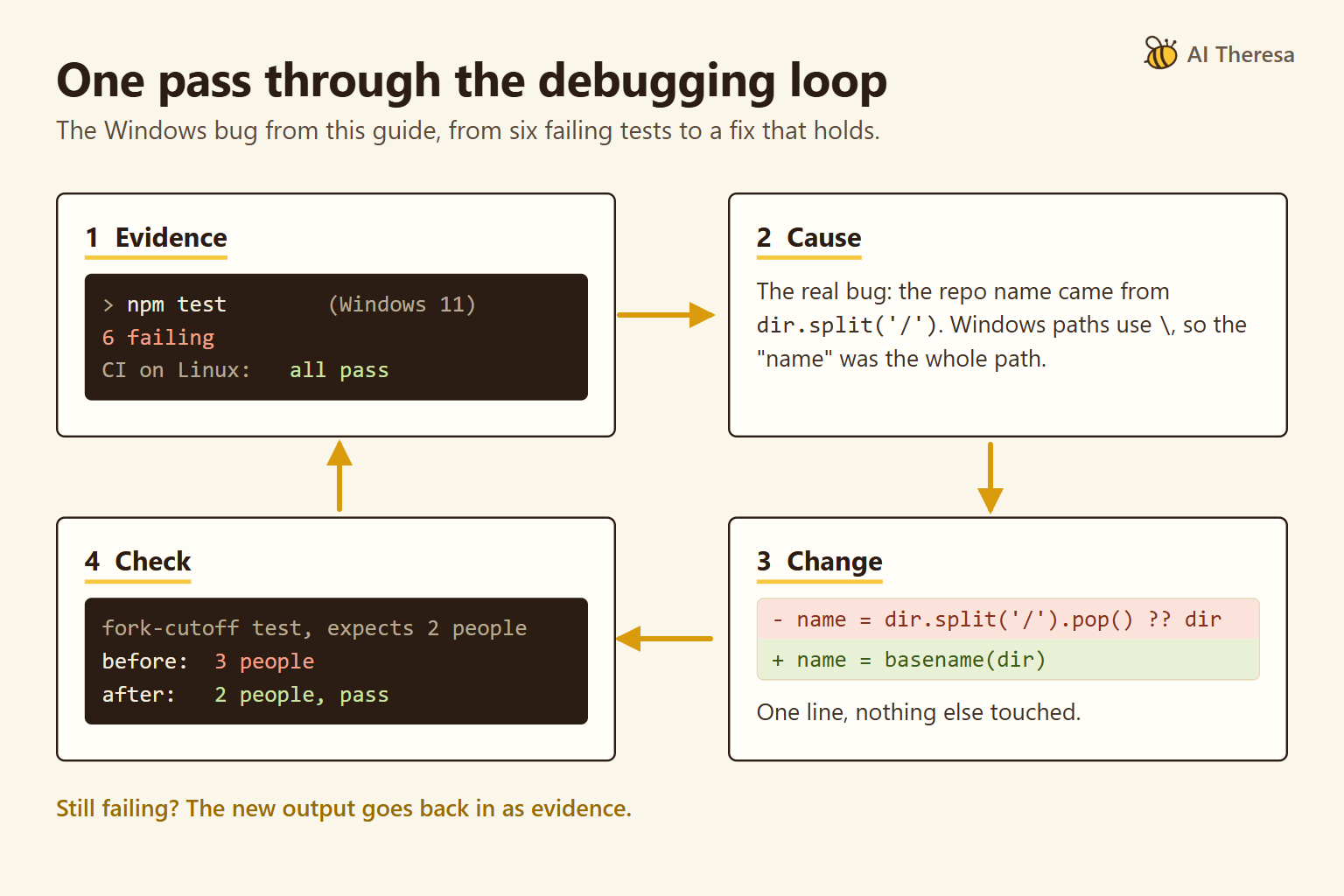
Most AI debugging follows the loop a careful developer already uses. Gather evidence, form a hypothesis (a testable guess) about the cause, change the code, and check the result. If the check fails, its output becomes new evidence and the loop repeats.
The evidence is called context: the information the model receives with the request. For a bug, that usually means the error, the stack trace (the chain of function calls that led to the error), the relevant code, and a way to trigger the problem.
Missing context is a common reason for a poor answer. A model shown one file cannot see the caller that passes it bad data.
Coding agents change who runs the loop. VS Code describes Copilot's agent mode as monitoring terminal and test output and correcting itself until the task is done.
If the check is weak, an agent can stop at a change that hides the error without removing its cause. Anthropic's guidance for Claude Code says that without a check, "looks done" is all the agent has to go on, and "that makes you the test suite."
Get Started with Theresa for FREEHow Does AI Help Developers Debug Code?
Reading an unfamiliar error
A stack trace from a framework you rarely use can run to dozens of lines. An assistant can point to the line that belongs to your code and explain what the library expected, as JetBrains' Explain with AI does for runtime errors and failing tests.
Finding where a value comes from
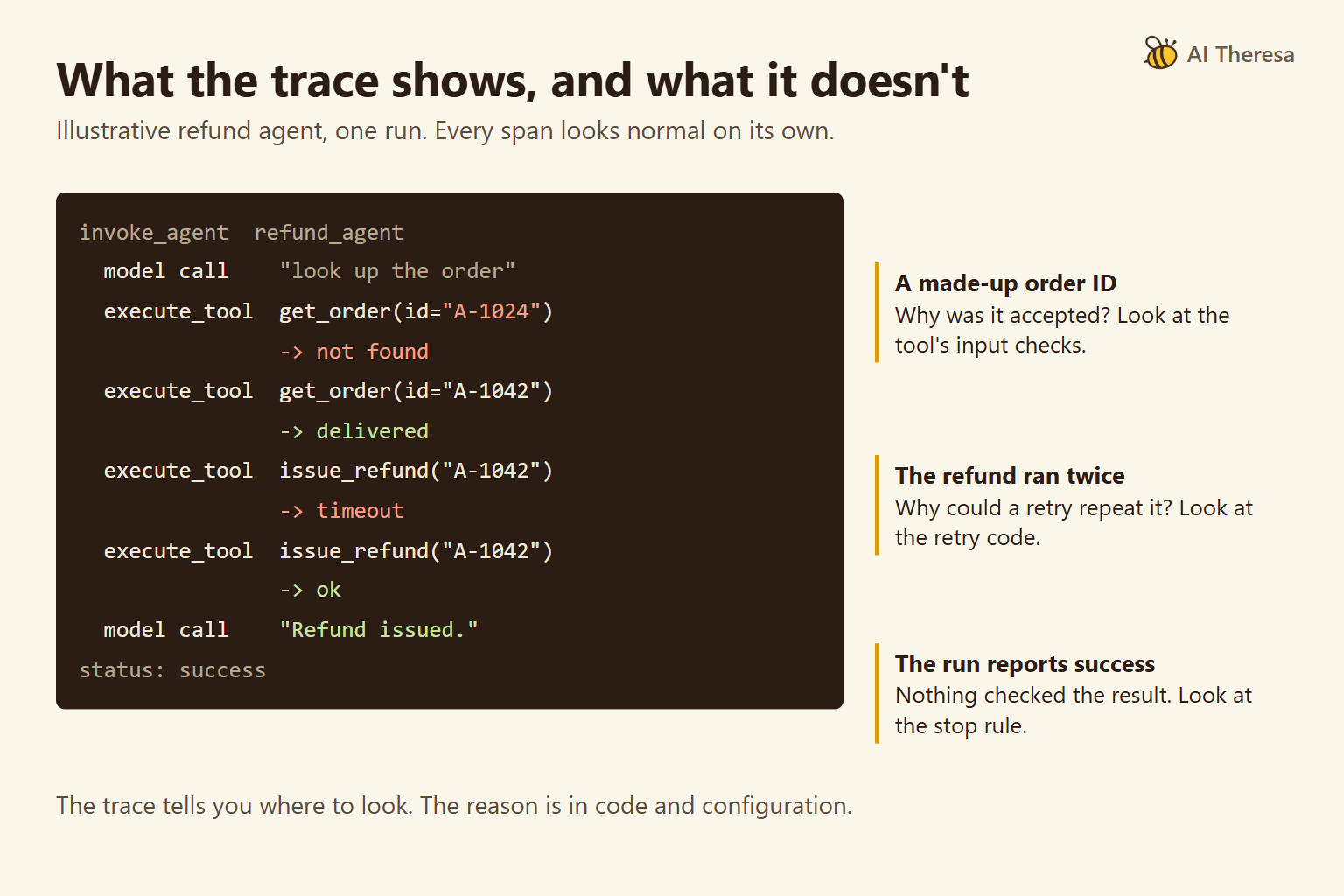
Many bugs come down to where a value was set and why it is wrong at the point of failure. An agent can search the project and follow the calls faster than a person opening files one at a time. Ask it to show the path it followed so you can check each step.
Turning a report into a failing test
A bug described in words is hard to fix and harder to confirm. An agent can write a test that reproduces the report. The test shows the bug is real. Later it shows the fix works, and it stays in the suite in case the bug comes back.
Get Started with Theresa for FREEThe Benefits of AI Code Debugging
The main gain is a credible first explanation sooner, especially in code you did not write. The table shows how each benefit appeared in the Windows case, and what to check before relying on it.
| Benefit | In the Windows case | What to check |
|---|---|---|
| Triage of many failures at once | Six failures sorted into five setup limits and one bug | Each proposed cause points to code you can inspect |
| A test that confirms the fix | The fork-date test now passes on Windows | It runs on every platform you support, in CI if possible |
| Decisions recorded in the code | Each skipped test states why it is skipped | A later reader can tell a known limit from a hidden bug |
In Stack Overflow's 2025 survey, the most common frustration with AI tools, named by 66% of respondents, was solutions that are "almost right, but not quite." An almost-right fix can take longer to debug than no fix at all, because it looks finished.
Get Started with Theresa for FREECommon AI Code Debugging Techniques
Reproduce with a failing test
Ask the AI to write a test that fails because of the bug, and confirm that it fails for the reason you expect. Only then ask for the fix. Every later step uses this test as its check.
Log before you fix
When the cause is unclear, ask for logging rather than a fix. The AI lists what it suspects and adds log statements that would confirm or rule out each suspect, then reads the output after you trigger the bug. Cursor's Debug Mode works this way and removes the logging once the fix is confirmed. It suits timing problems, where reading the code is not enough.
Narrow a regression with git bisect
A regression is a bug in something that used to work. git bisect run can search the commit history for the change that introduced it. Save the failing test as a script outside the repository, since older commits will not contain it, and pass that script to git. The AI helps write the test; git does the search and returns a specific commit to read.
Ask a question across the codebase
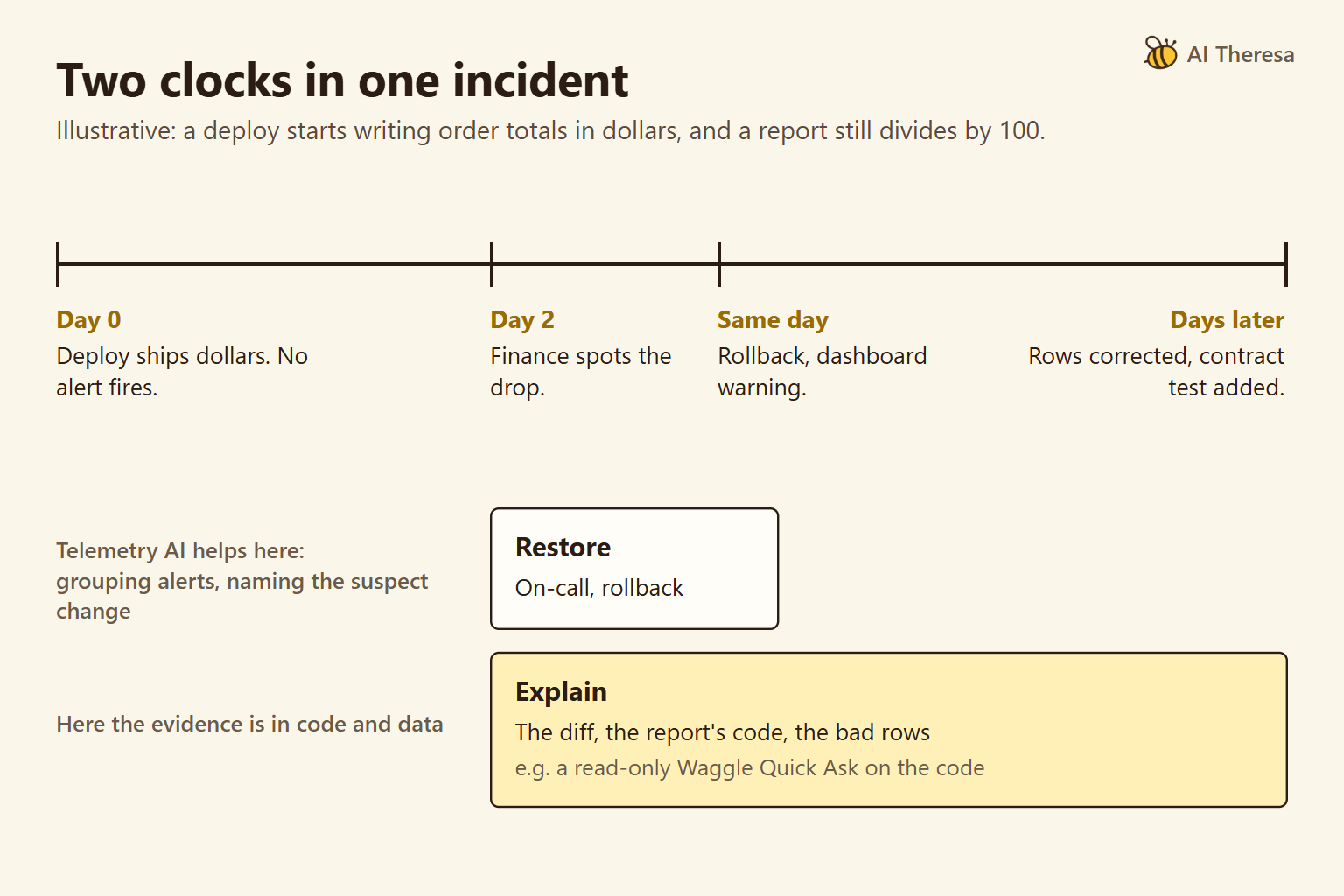
Some questions span many files and no single test, such as why a report and a dashboard disagree on the same total. Waggle, the open-source auditor from AI Theresa, answers this kind of question with Quick Ask. It investigates read-only, cites the code behind each claim, and reports a claim it cannot support as an open question rather than a finding.
Waggle does not run your code, so it works alongside an agent that runs tests. It does not replace one. It is also available as a Claude Code plugin.
Get Started with Theresa for FREEHow to Debug Code Using AI
These steps follow the Windows case from first failure to merged fix.
1. Reproduce the bug and note where it ran
Start with a command that shows the failure, and record the environment, because it can be part of the cause. Here, npm test failed six tests on Windows 11 and passed in continuous integration (CI), the automated checks that run on every change, which used Linux.
2. Give the AI a check it can run
Tell the agent which command proves the bug is fixed. Here, it was the same test command on Windows. Without one, an agent can report success based on how the code looks.
3. Write a short brief
A few lines written up front save several rounds of questions. This is the brief we used.
| Part of the brief | Windows example |
|---|---|
| Symptom | Six tests fail on Windows |
| Expected | All tests pass, as they do on Linux |
| Actual | A different error in each test (output attached) |
| How to reproduce | npm test on Windows 11 |
| Already tried | Nothing yet; CI passes |
4. Ask for the cause of each failure before any fix
The quickest change was to skip all six tests on Windows. The suite would have turned green. We asked instead why each test failed. The agent read every failing test with its error output and proposed a cause for each, and we checked each cause against the code.
Five failures came from the test setup. Four tests used small stand-in programs written as shell scripts, which Windows cannot run directly. One created symbolic links (files that point to other files), which Windows allows only with extra permissions. These failures came from the tests, not from Waggle's code.
Skipping them still leaves that code untested on Windows, so the reason is written into each test.
The sixth failure was a real bug. The test builds a forked repository (a copy of another project) and tells Waggle to ignore commits from before the fork. It expected two people across the organization and found three, because an author from the original project was still counted.
The code took each repository's name by splitting its folder path on "/". Windows paths use "", so the "name" was the whole path, and the cutoff stored under the short name never matched. Windows users saw upstream authors counted as their own team, and full paths where repository names belonged.
5. Ask for evidence, then review the change
The fix was one line: Node's basename() takes the last part of a path using the rules of the system it runs on. The agent showed the test failing before the change and passing after it.
Review the change as you would a colleague's pull request. It should touch only what the cause requires and add no dependency you did not ask for. It should not weaken, skip, or delete tests unless you agreed to that and the reason is written down.
6. Run the full suite on every platform
A fix can pass its own test and break another. Run the full suite on every platform you support, ideally in CI, so the check repeats on every change. Our CI ran only on Linux, which is how this bug reached a release.
Get Started with Theresa for FREEHow Does AI Detect and Fix Code Errors?
An AI tool notices an error in one of three ways. It reads error output, it recognizes a pattern in the code that often causes trouble, or it runs a check and sees it fail. To fix it, the model narrows the search to a few suspect lines, writes a candidate change, and, if it can, runs a check to see whether the change works.
Running a check is the most reliable of the three, and it is how this bug surfaced. A developer ran the existing tests on Windows. CI used only Linux, and reviewers had read the code with Linux paths in mind. The agent came in after that, to explain each failure.
Waggle did not catch this bug either. It reads code without running it, and on Linux the code was correct, so reading alone could not show the problem. When an AI tool reports a bug it found by reading, treat the report as a hypothesis until a check confirms it.
Benchmarks judge AI fixes with tests. SWE-bench Verified gives an agent a real GitHub issue and the project's code, then runs tests the agent never saw. A fix counts if the tests that failed before now pass and a chosen set of previously passing tests still pass.
Passing those tests does not prove a fix is right. Researchers re-ran patches from three leading agents that had passed SWE-bench Verified against more tests, and estimated that about 11% were still wrong. OpenAI, which built the benchmark, stopped reporting it in February 2026 after finding flawed tests and signs that models had seen the answers in training.
Some tools add a second reading that does not depend on tests. In a Waggle Full Scan, a separate audit stage re-checks each claim against the code and drops what it cannot support. A model checking a model catches some errors but shares others, so treat it as a filter, not a test.
Get Started with Theresa for FREELimitations of AI Code Debugging
Fixes that look right
The most common failure is a fix that is plausible but wrong. It compiles, the error goes away, and the code reads well. A close relative is the symptom fix: a check for an empty list stops a crash but leaves open why the list was empty.
Cursor's debugging page warns that a fix may address "the symptom without addressing the underlying problem," and says the developer makes that call. Skipping our six tests would have been a symptom fix.
Agents can also reach a green run by changing the test instead of the code. ImpossibleBench built tasks whose tests contradict the specification, so passing them requires cheating, and frontier models often passed anyway, frequently by editing tests. Read every change to a test file.
Too little evidence
Without a reproduction, the AI has nothing to check against. Intermittent bugs, such as those caused by timing between threads, are the hardest case, and asking for logging works better than accepting the first explanation.
Flaky tests, which sometimes fail on their own, cause a related problem. Run such a test several times before and after the change, because one green run after a fix proves little.
Large projects add another gap. An agent that reads only part of a codebase can miss the code that matters. Point it at the right area, and check that its explanation follows the real call path.
Confident output that needs checking
Models suggest packages and functions that do not exist. A USENIX Security 2025 study of 16 models found invented package names in their code, and attackers can register those names. Check every new dependency before you install it.
Auditing tools need the same care. Waggle's README says its claim audit reduces unsupported claims but does not remove wrong ones, and that it has no published accuracy benchmark. It asks users to check each finding before acting on it.
Get Started with Theresa for FREEConclusion
AI code debugging works best as a loop the developer controls. The AI gathers evidence, proposes a cause, and changes the code. A check decides whether the change stays.
Give the AI a reproduction and a check it can run, and ask for the cause before the fix. Use it to speed up the search, and keep the decision about what counts as fixed with a person and a test that exercises the right behavior.