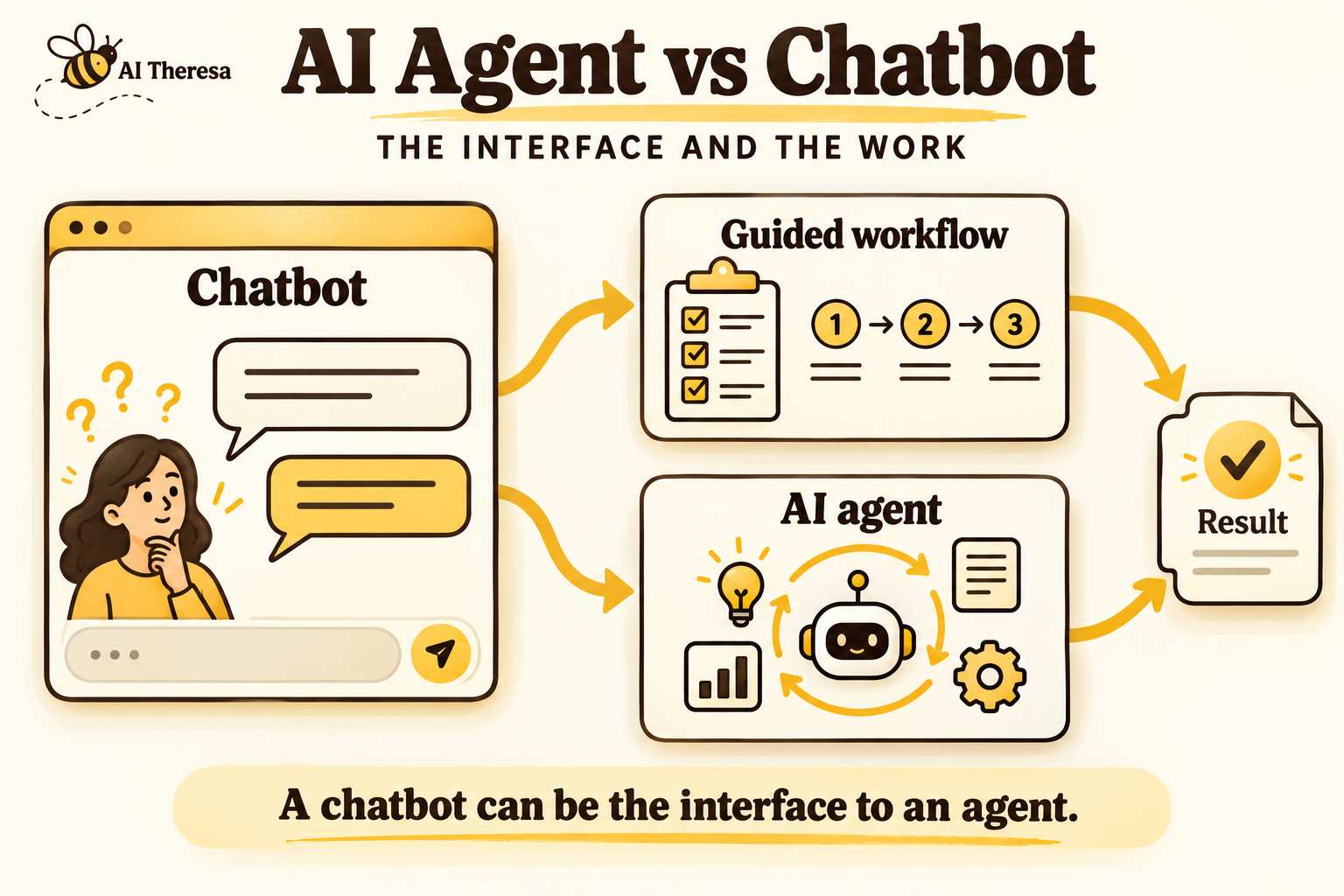
A chatbot is software you talk to through text or voice. An AI agent is software that chooses and carries out steps toward a goal. The two can work together: you describe what you need in chat, and an agent handles the task behind the conversation.
For a business comparing AI agents vs chatbots, the useful question is how much of the work the software should decide for itself. Answering product questions or following a booking process may need a chatbot with a defined workflow. Resolving a request that needs investigation across several systems may benefit from an agent. Either can complete transactions when connected to the right business software.
What Is an AI Chatbot?
An AI chatbot uses artificial intelligence to interpret what people say and respond in conversation. It can explain a policy, answer product questions, or collect information for a service request.
Traditional chatbots often follow menus or scripts. AI chatbots can recognize different ways of asking the same question. Generative AI chatbots can also compose replies using the information supplied to them, instead of selecting a prepared answer. IBM's chatbot overview explains these approaches and how chatbots connect to business applications.
Those connections determine what the chatbot can actually do. A chatbot with access to a scheduling system can book an appointment. One that only has your opening hours can explain when you are available, but cannot reserve a slot. Both may sound equally fluent in conversation.
Get Started with Theresa for FREEWhat Is an AI Agent?
An AI agent chooses what to do next using earlier results. Many modern agents use a large language model (LLM), AI software that interprets and generates language, to understand requests and help make those choices.
The model works with tools: connections that let the agent search records, use applications, or change information. Supporting software carries out the selected action and returns the result. The agent can then continue, ask a question, or finish the task.
An agent does not need someone to type every instruction in chat. A new support ticket or a scheduled job can start its work. Depending on its permissions, it can complete an assignment or prepare work for someone to approve.
Vendors use these terms differently. This article follows Anthropic's distinction between workflows and agents: a workflow follows steps defined in code, while an agent lets the model choose some of the steps and tools.
Get Started with Theresa for FREEHow Do AI Agents Differ From Chatbots?
Chat describes how someone interacts with the software. Agent describes how the software pursues a task. A chatbot can use fixed workflows, an agent, or a combination of both.
A configured flow follows a maintained route
A booking chatbot might ask which service you need, show available appointments, and reserve the time you choose. Its developers define the sequence, including what happens when a slot is unavailable.
This approach works well when the business already knows the required steps. AI can help interpret the customer's wording while the booking process remains fixed. Completing several steps does not, by itself, make that process an agent.
An agent selects some steps from the findings
Suppose a customer books a standard house clean, then mentions dust from recent renovation work. An agent could check the company's service descriptions, find that construction cleanup needs a different booking, and ask the customer to confirm before finding a suitable slot. The customer's description changes what the agent checks next.
The extra flexibility helps with requests that do not fit a single route. It also creates more opportunities for mistakes: the agent might pursue an irrelevant detail or choose an unsuitable action. Its decisions need testing alongside the tools it uses.
Shared capabilities are not distinguishing features
Both designs can remember earlier messages, read customer records, and complete transactions. Both can require approval before making a change. An agent is not automatically more accurate, and it does not automatically learn from every conversation. Those capabilities depend on how the product is built and maintained.
Get Started with Theresa for FREEAI Agent vs Chatbot: Side-by-Side Comparison
Because the categories overlap, the practical comparison is between a chatbot following a fixed workflow and one using an AI agent.
| Business question | Chatbot with a fixed workflow | Chatbot using an AI agent |
|---|---|---|
| How does it choose the next step? | Follows the sequence and branches its developers defined. | Uses the model to select a step based on the request and findings so far. |
| Which work suits it? | Repeatable requests with known rules, such as standard bookings. | Requests needing different lookups or actions from case to case. |
| What happens outside the expected process? | Uses a prepared fallback, such as asking for details or contacting support. | Can try another permitted approach, ask for details, or seek help. |
| What does the team maintain? | Conversation flows, business rules, content, and connections. | Instructions, tools, content, and checks on the agent's decisions. |
| What can add cost or delay? | Long conversations, complex flows, and failed connections. | Asking the AI to process information repeatedly, unnecessary searches, and correcting mistaken actions. |
The cost examples can affect either design. Access to business systems and permission to change records are separate choices in both designs. The word "agent" does not give software access to your accounts or authority to spend money.
Get Started with Theresa for FREEHow AI Agents Handle Tasks Beyond Conversations
Consider a hypothetical customer who wants to change a delivery because they will be away on Friday. The retailer has connected its service to the carrier's booking system, so it can request supported changes.
After the customer signs in and identifies the order, the agent checks its status. The parcel has already been collected. That finding leads the agent to check the carrier's options instead of trying to edit the retailer's dispatch instructions.
The customer prefers Saturday, but the carrier offers only Monday delivery or collection from a pickup point. The agent presents those options and asks which the customer wants. It cannot assume that collecting a parcel is an acceptable substitute for home delivery.
The customer chooses Monday. The application checks that the slot is still available, submits the change, and confirms it against the carrier's updated record. The customer receives the new delivery date without a support employee switching between systems.
If the carrier does not respond, the service should show the request as pending while it checks whether the change went through. Sending it again immediately could repeat an action the carrier already accepted. Any new fee would also need the customer's agreement.
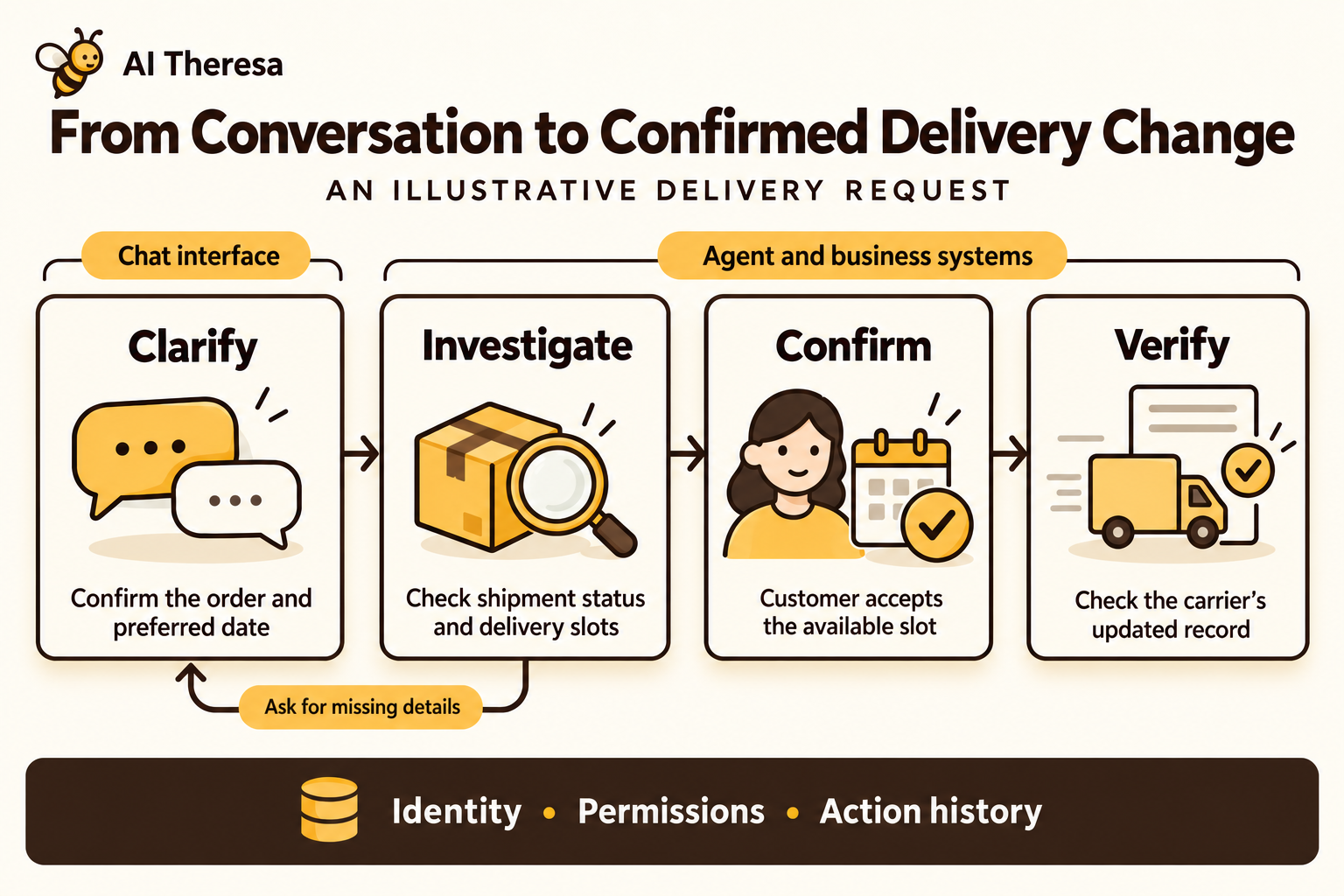
A fixed workflow could handle this case too if the team had defined these routes. An agent becomes more useful when requests vary enough that staff regularly have to decide what to check next. Our agentic workflow automation guide explains that broader process.
Get Started with Theresa for FREEAI Agents vs Chatbots: Real-World Examples
Dialogflow CX: conversations that trigger business actions
Google's Dialogflow CX supports conversational applications. Its connections to other services let a conversation trigger business actions and use the results in a reply.
For example, a booking flow can send the customer's selected date to a scheduling service. That service creates the appointment and returns a confirmation or explains why the booking failed. The chatbot can finish the transaction through a defined sequence. Google uses the word "agent" for its conversational application, so the product label alone does not tell you how it chooses its steps.
Agentforce: service requests connected to configured actions
Salesforce's Agentforce service examples include order lookups, reservations, and delivery changes. Businesses configure the actions the agent can take and the instructions governing them.
For a buyer, the relevant detail is whether those actions work with the company's records and processes. A reservation example does not mean the product can book through any scheduling system without setup. Salesforce presents these scenarios as starting points for configuration.
Theresa: turning business descriptions into working workflows
In Theresa's Model Home Studio, a user describes their business and the work they want to automate. The agent builds a working prototype showing how AI agents would carry out that work.
The user can explore the prototype and request changes through conversation. Chat captures the requirements, while the agent generates a system the business can try and refine. This gives the team something concrete to review before connecting it to live business applications.
Get Started with Theresa for FREEWhen Should Businesses Use AI Chatbots?
A chatbot is a useful starting point when employees spend time answering questions that already have reliable answers. Customers might need help finding a suitable service, understanding a policy, or checking an account. Staff might need a convenient way to search internal guidance.
A chatbot with a fixed workflow can also handle predictable transactions. Standard appointments and account lookups do not necessarily need an agent to choose the process. Keeping those steps defined makes it easier to check that the required information is collected.
Conversation should make the task easier for the user. A calendar can be faster than chat when someone knows the date they want. A form may be clearer when several details must be reviewed together. Chat is especially useful when people need to explain a situation before they know which option to select.
Get Started with Theresa for FREEWhen Should Businesses Use AI Agents?
Consider an agent when employees spend substantial time deciding what information to look for and what action should follow. The opportunity is the work between receiving a request and resolving it.
An invoice discrepancy might require comparing the invoice with an order, delivery records, and a later credit note. An agent could locate the relevant documents, identify the mismatched items, and update the case with an explanation. If authorized, it could also carry out a permitted correction; otherwise, an accounts specialist would approve it.
This is useful only if the agent can reach reliable records and match them to the right customer. A convincing explanation of the wrong invoice creates more work. The business benefit comes from completing the investigation or correction with less staff effort, while keeping the result easy to check.
Get Started with Theresa for FREEAdvantages and Limitations of AI Agents and Chatbots
Advantages and limitations of chatbots
Chatbots can answer customers outside staffed hours and reduce repetitive questions for employees. People can describe what they need instead of searching several pages or navigating menus. Connected to business software, a chatbot can also complete routine bookings or account lookups without making someone wait for staff.
Their usefulness depends on the information and processes behind them. A fixed flow may struggle with an unexpected request, while an AI-generated answer can misinterpret a policy. Applying the return rules for unopened goods to a damaged item, for example, could give a customer the wrong advice.
Advantages and limitations of AI agents
Agents can gather information across applications, decide what to check next, and complete authorized work. This can save employees from performing each lookup, copying information between systems, or passing a case to another team. In the invoice example, the agent could assemble the records and explain the discrepancy, leaving the accounts specialist to review the result rather than repeat the investigation.
That flexibility also allows mistakes in choosing or carrying out an action. Unnecessary searches can increase costs and delay the result. Testing, maintaining connections, and correcting errors take staff time, so the work saved needs to outweigh that effort. Cases customers reopen should count when measuring success.
Both chatbots and agents need limits on what they can change. OWASP's excessive-agency guidance recommends restricting available actions and permissions. A service that checks shipment status does not necessarily need permission to change addresses. Connected systems should enforce those limits, with approval required for consequential changes where appropriate.
Get Started with Theresa for FREECan Chatbots and AI Agents Work Together?
Yes. A company can keep one chat experience while using different approaches behind it. Routine questions can use approved information, standard requests can follow fixed steps, and cases needing investigation can go to an agent.
The customer should not have to repeat information when the work moves between them. The agent needs the request, the correct account, and any choices the customer has already made. The chat should then show what has been completed and what is still waiting.
Human support can join the same process when needed. Passing along the checks already performed and the unresolved issue lets an employee continue the work instead of starting the conversation again.
Get Started with Theresa for FREEWill AI Agents Replace Traditional Chatbots?
Some businesses will replace rigid conversation flows with agents. Others will add agent capabilities to selected tasks while keeping the flows that already work. Customers may continue using the same chat window throughout.
The reason a chatbot struggles matters. If it answers from an outdated policy, the content needs fixing. If it cannot create a booking because the scheduling connection is broken, an agent will still face that broken connection.
An agent is more promising when the existing service repeatedly hands work to employees because the next step requires interpreting the case. That gives the business a specific problem to test, without replacing every successful interaction at once.
Get Started with Theresa for FREEHow to Choose Between an AI Agent and a Chatbot
Start with one job your team handles often. Describe a successful result in ordinary business terms: a question answered correctly, an appointment booked, or a billing discrepancy resolved. Then identify why the work currently needs a person.
| What your team needs | Sensible starting point |
|---|---|
| Answers from product information or company policies | An AI chatbot connected to maintained sources. |
| A repeatable transaction with known rules | A fixed workflow, using chat if conversation helps the user. |
| Investigation where each finding changes the next step | An agent with access to the necessary records and actions. |
| A mixture of routine requests and unusual cases | One chatbot that can use workflows, agents, and human support. |
Ask a vendor to demonstrate your own typical requests, including a case with missing information. Check the actual booking or account update as well as the reply. A helpful-sounding message is not proof that the work happened.
Compare the setup cost, subscription or usage charges, maintenance, and staff time still needed per completed task. Measure how often people must correct or reopen the work. An inexpensive conversation can be costly if an employee has to redo it.
Before expanding, decide who will maintain the service and handle exceptions. Our enterprise AI agent deployment guide covers moving from a trial to daily use.
Get Started with Theresa for FREEFinal conclusion
The AI agent vs chatbot choice depends on the work your business needs done. A chatbot makes software accessible through conversation. An agent can choose and carry out steps toward a result, sometimes through that same chatbot.
Keep defined workflows for tasks with clear rules. Consider an agent where adapting to each case saves meaningful effort. Judge the result by whether customers and employees get their work completed accurately, at a cost the business can justify.