Enterprise AI agent deployment makes an agent available through the systems a business already uses. Employees need useful results and help when something goes wrong. The operating team needs to know whether those results justify the cost.
The main deployment choice is how much your team will build and operate. A managed agent service handles some of the infrastructure. An existing cloud application can also host an agent, especially when the team already runs its own business integrations. Both approaches still need reliable access to company information and someone responsible for the service.
What is enterprise AI agent deployment?
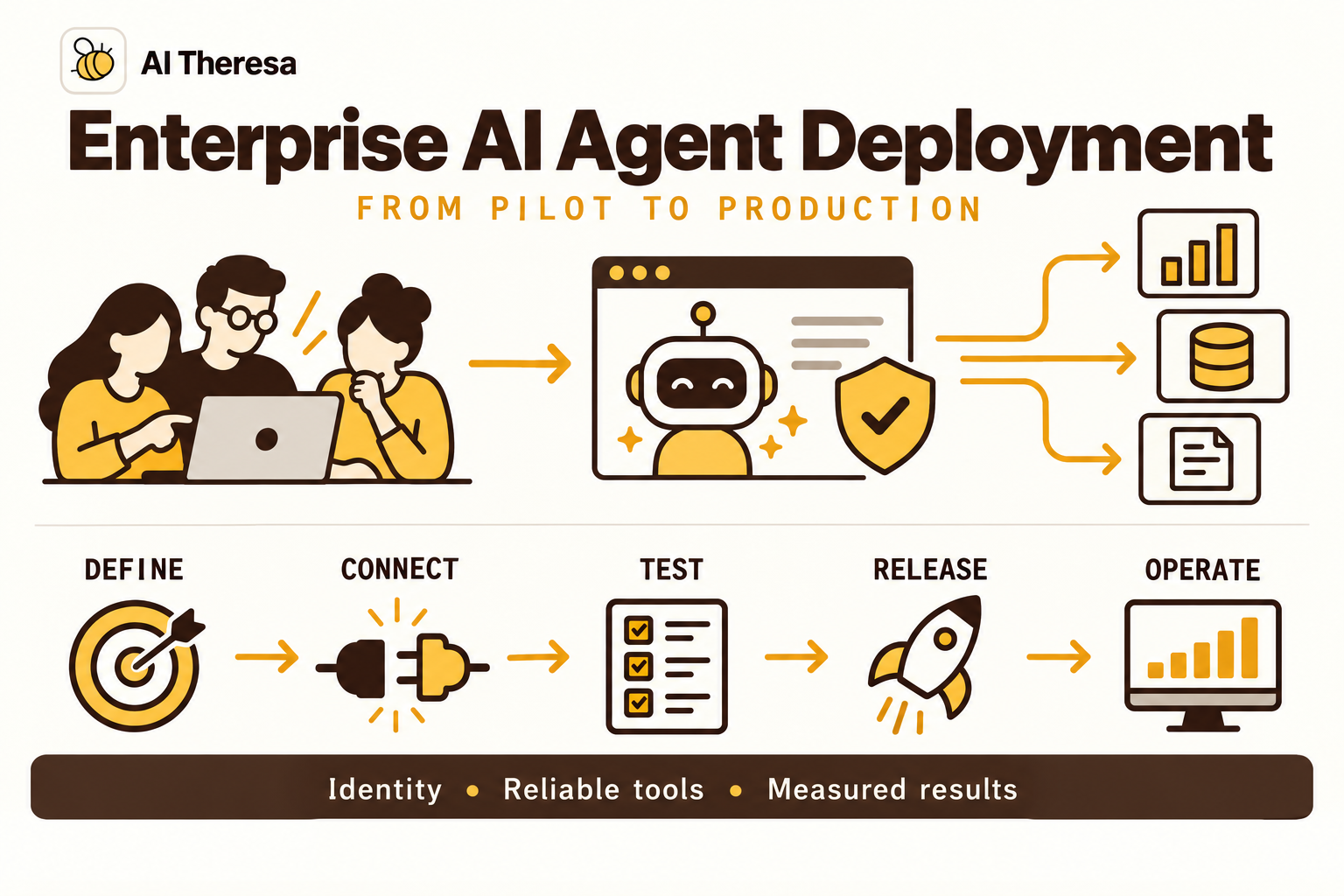
Enterprise AI agent deployment is the work of connecting an agent to approved business systems, testing its behavior, and putting it into use with ongoing support. It includes deciding which tasks the agent handles and how employees continue when it cannot finish.
A demo can show that an agent completes a task under selected conditions. Production deployment adds the support needed for everyday use: access controls for its users, connections to current business data, and a clear handoff when a request falls outside its scope. Changes to its code, instructions, or model settings should be tracked and tested before release.
Deployment does not require full autonomy. An agent that prepares an accurate investigation for a service team can be useful in production. Giving it permission to change accounts or send messages expands its responsibilities and the checks needed before release.
Get Started with Theresa for FREEHow does AI agent deployment work?
The team first prepares the application: it chooses where the software runs, connects data sources, sets up access, and tests the intended task. Employees then reach it through a familiar interface, such as their service portal or workplace chat.
Consider a hypothetical employee request: "I need the design application for a customer project." Today, a service-desk analyst might ask which application, look up existing licenses, find the department's approval policy, and send the request to the software owner.
An agent could ask for the missing application name, find an available license, and check whether the employee already has the required approval. If approval is missing, it prepares a request identifying the application, available license, project, and person who must approve it. The employee receives a clear status and next step. The software owner gets the information needed to act without repeating those searches.
In this first deployment, the agent does not assign licenses. The application passes its proposal to a reviewer and records the resulting ticket number after submission. Once that limited service proves useful, the team can separately evaluate whether approved license assignments should be automated.
The model helps interpret the request and decide which information to look up. Application code handles sign-in, permitted operations, and ticket submission. Our agentic workflow automation guide explains how that division works within individual workflows.
Get Started with Theresa for FREEWhy deploy AI agents in enterprises?
The strongest opportunities involve recurring work where employees spend substantial time finding and interpreting information. The business case depends on how much of that effort remains after people check the agent's output.
Reduce investigation time
A support analyst may need account history, recent incidents, and previous correspondence to understand a customer issue. An agent can gather relevant records and identify gaps before the analyst starts. Measure the time to an accepted investigation, including corrections; a quick summary that omits the important record creates more work.
Make business systems easier to use
Theresa delivered a YouTube data warehouse and agent to help a company track its managed channels, spot trending videos and channels, and identify potential collaboration candidates.
The warehouse brings the channel and video data together, and the agent helps the team explore it for those business questions. For example, a team member can ask which trending channels are worth investigating for a collaboration. The results provide a starting point for further research, with people still assessing whether a candidate fits the company's needs.
Keep work moving between teams
A handoff is easier when the next team receives the request, relevant findings, and outstanding decision together. An agent can assemble that context and track the response. For a handoff that follows fixed rules, conventional automation may be sufficient and cheaper to operate.
Get Started with Theresa for FREEKey components of AI agent deployment
The model is one component of the service. The surrounding software determines which business systems it can reach and what happens to its work.
| Component | What it does | What the team must decide |
|---|---|---|
| Model and instructions | Interpret requests and select useful steps | Which decisions the agent should make |
| Tools and integrations | Search records or perform specific operations | Which sources and actions the task needs |
| Runtime | Run the agent's application code | Where it runs and how much work it can handle |
| Saved task progress | Retain findings and pending decisions | What must survive a pause or restart |
| Identity and permissions | Identify callers and restrict access | Whose authority each operation uses |
| Evaluation and monitoring | Test results and expose failures | How to recognize success and investigate problems |
Model access is an application dependency
Model choice affects response quality, speed, and cost. Test candidates on the actual work, including tool selection and the formats your applications expect. A model that writes well may still select the wrong account or omit a required field.
Treat a fallback model as a separate configuration to evaluate. If the primary provider becomes unavailable, switching models without testing can introduce different errors. The application also needs a clear response when it reaches a usage limit or cannot obtain an answer.
Tools need explicit results
A tool is a defined operation the agent can request, such as checking a license inventory. Its result should distinguish "no license available" from "inventory system unavailable." Those findings call for different next steps.
For an operation that changes a record, return confirmation from the receiving system, including its record identifier. Keep credentials in the integration service rather than placing them in the model's conversation. Give a research tool read access when changing records is unnecessary.
State connects work across interruptions
State means the information needed to continue a task: what the employee requested, what has been found, and what is waiting for a reply. Save it outside the running program if the work must survive a restart.
LangGraph checkpoints, for example, preserve snapshots of workflow progress. A database-backed checkpoint can let another worker continue after the original process stops. The application still needs to know whether any action in a connected system succeeded.
Get Started with Theresa for FREETypes of enterprise AI agents
Enterprise AI agents can complete work within their authorized scope. These overlapping deployment patterns describe responsibility across departments.
| Agent type | Responsibility | Example |
|---|---|---|
| Research and advisory agents | Analyze information and recommend action | Compare channel performance and identify potential collaborators |
| Task-execution agents | Complete a defined task using connected systems | Assign an approved software license, verify access, and close the request |
| Workflow agents | Carry a process through decisions and systems to completion | Handle a software request from clarification through approval, provisioning, and confirmation |
| Ongoing operational agents | Handle recurring work and follow unresolved items over time | Monitor data imports, investigate failures, retry recoverable jobs, and escalate exceptions |
Customer service and software engineering can use any pattern. People remain involved where approval or judgment is required. Completion means verifying the outcome: restoring access and confirming it works, rather than just submitting a ticket.
Multiple agents can contribute specialist tools or context, but coordinating their findings and preventing conflicting updates adds work. Use the simplest arrangement that completes the job reliably.
Get Started with Theresa for FREEEnterprise AI agent architecture
A practical architecture separates the employee interface, the software running the agent, and the connections to business systems. Each part has a different responsibility.
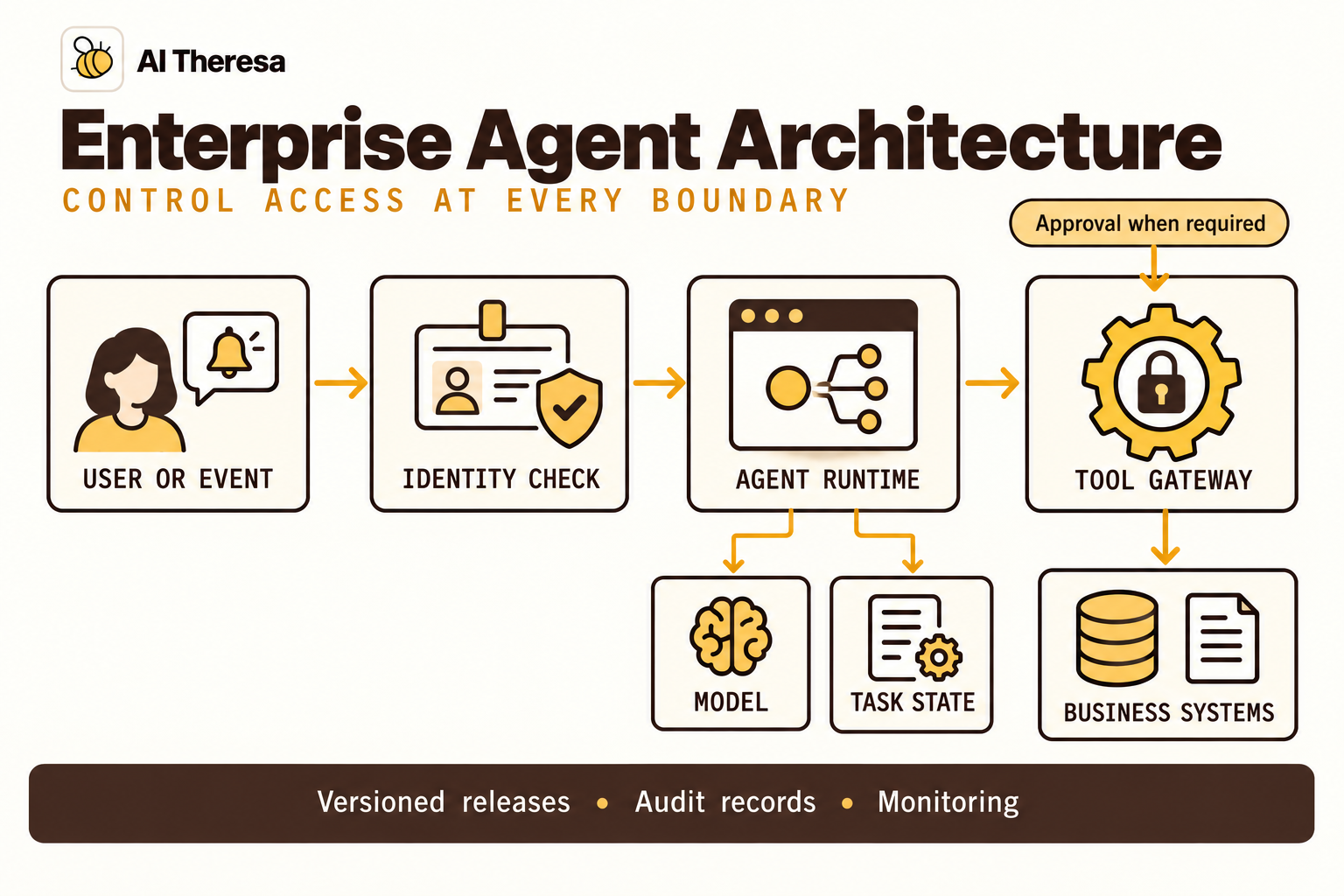
The entry point checks who is making the request. The agent application loads the relevant context and asks the model for a next step. An execution layer then checks the proposed operation before calling the business system. A tool gateway is a shared service where these connections and checks can be managed.
Authentication establishes identity. Authorization determines what that identity may do. Signing in successfully does not give an employee access to every record the agent can reach. The application and connected systems must enforce the relevant restrictions, including after a long wait when access may have changed.
Plan for long tasks and duplicate events
A task can wait for approval without keeping a program running throughout the wait. Save its progress, then use a queue to request another run when the reply arrives. Give the task a stable identifier so employees and support staff can follow it across restarts.
Queues may deliver the same work more than once. Recording which worker owns a task, and rejecting attempts from a worker that has been replaced, prevents competing workers from continuing the same task.
There is a separate problem when a connected system saves an update but the confirmation never reaches the agent. Before retrying, check the original operation's status and use the destination's duplicate-prevention mechanism where available. Some systems accept an idempotency key, an identifier reused across attempts so they can recognize the same operation. If success cannot be established safely, leave the action unresolved for an operator.
Follow the data beyond the runtime
Hosting the application privately does not mean all its data stays there. Prompts may go to an external model provider, and monitoring tools may store copies of retrieved records. Map those flows, including retention and deletion arrangements, before choosing a deployment location.
Keep development and production credentials separate. Engineers need a way to reproduce failures without changing live accounts. Where realistic records are necessary for evaluation, limit access and retain only what the test requires.
Get Started with Theresa for FREEAI agent deployment models
Choose according to the applications the agent must reach and the operating capacity of your team. Agent hosting and model hosting are separate decisions: your application can run on infrastructure you control while calling a managed model.
Managed and self-hosted describe who operates the agent application. Hybrid describes where its components are placed. These choices can overlap; a hybrid deployment may use a managed runtime.
Managed agent services
A provider runs much of the hosting infrastructure. Your team configures the agent, connects company systems, and evaluates its work. This can suit teams that want to avoid building the execution infrastructure themselves.
| Platform | Documented capabilities | When to put it on your shortlist |
|---|---|---|
| Amazon Bedrock AgentCore | Runtime, identity, tool access, memory, and monitoring services usable together or separately | You have agent code and want to add managed hosting or tool access while retaining your chosen framework and model provider |
| Microsoft Foundry Agent Service | Managed prompt agents or hosted custom code, Entra identity, and publishing to Teams | Your users work in Teams and your organization uses Entra; you want a managed path for either configured agents or your own code |
| Google Gemini Enterprise Agent Platform | Managed Agent Runtime, sessions, memory, evaluation, and Cloud Logging and Trace integration | You use Google's Agent Development Kit or a supported framework and want to run it with Google Cloud's monitoring and evaluation services |
These capabilities overlap, so an existing cloud environment can help narrow the shortlist. Service-level constraints still matter: Google's security controls vary by service, and Microsoft's networking guidance identifies tools that cannot use private network arrangements.
Self-hosted deployment
Your team operates the agent application on its own cloud infrastructure or on-premises systems. This may fit an existing application platform with established deployment, monitoring, and support practices. It gives engineers control over configuration while leaving them responsible for capacity and maintenance.
Running the model yourself is an additional decision. It introduces hardware and model-serving work that is unnecessary when an approved external model API meets the requirements.
Hybrid deployment
A hybrid design splits components across environments. Cloud-hosted agent software might call a restricted service near an internal database. That service performs permitted lookups without exposing the whole database or network.
Test the complete connection early. A successful model demonstration says little about whether the production service can reach an internal application with the intended employee permissions.
Agents inside existing business platforms
An agent within a CRM or service-management product can be practical when most of its work already happens there. Employees have a familiar interface, and existing integrations may reduce setup work.
Check what happens when a request needs another department's system. Compare the cost and limitations of extending the platform with a separate application before committing to a wider rollout.
Get Started with Theresa for FREEHow to deploy enterprise AI agents
For the illustrative software-request agent, the first release produces a request ready for the software owner, including the license check and identifying whose approval is needed.
Microsoft's agent-building guidance recommends documenting responsibilities and prohibited actions in an agent charter. A short agreement with the service owner can establish this scope before implementation begins.
1. Define the first production task
Review recent requests with the people handling them. Find where time goes and which mistakes cause rework. Establish the baseline using total handling time, including follow-up questions and corrections.
A review-ready request contains the evidence the software owner needs. Missing employee details go back to the requester; policy exceptions need specialist help.
2. Select the environment and integrations
Start with the infrastructure and applications the enterprise already uses. Identify where the relevant data lives, how employees sign in, and how the engineering team deploys and supports software. Choose an agent runtime and integrations that fit those systems. Introduce new infrastructure where the existing stack cannot meet a specific requirement, weighing the benefit against the additional cost and maintenance.
For an organization already using Google Cloud, the following reference design shows one way to connect these components. Other environments can use equivalent services from their existing stack. This is an illustrative design, not a tested customer deployment.
| Component | Example implementation | Application work still required |
|---|---|---|
| Request and review interface | Cloud Run service behind the employee application | Check employee identity and assign a task identifier |
| Background work | Pub/Sub push subscription to a Cloud Run worker | Authenticate incoming messages and handle repeated delivery |
| Agent execution | Worker container calling an approved model API | Supply instructions and tools; limit execution time and spending |
| Saved progress | PostgreSQL task and action tables | Store findings, approval status, and confirmations from connected systems |
| Business integrations | Restricted service using Direct VPC egress | Configure network access and enforce record permissions |
| Monitoring | Logs associated with task and release identifiers | Expose failures and work requiring attention |
Google documents authenticated Pub/Sub delivery to Cloud Run and Direct VPC connectivity. Network connectivity supplies a route to an application; it does not grant permission to its records.
For reliable delivery, save the task and the request to run it together in the database. A separate process sends pending requests to the queue and records delivery. Worker runs must fit the services' delivery and execution time limits; longer work may need several resumable stages.
3. Build an evaluation set
Start with questions the team needs the agent to answer, using a fixed data snapshot so the expected results can be checked. For a YouTube analytics agent, suggested tests include comparing managed channels over a specified period, finding videos that meet an agreed definition of "trending," and identifying collaboration candidates against the team's criteria.
Check the answer against the underlying records. Did the agent use the correct channels, dates, and metrics? Do its conclusions follow from the data? A fluent explanation with the wrong date range is still an incorrect result. For recommendations, have the team assess whether the candidates fit its criteria and whether the supporting evidence is sufficient.
Include ambiguous questions, missing data, denied access, and failed lookups. Define when the agent should ask for clarification or explain that it cannot answer. Keep some cases separate from development, rerun important questions to check consistency, and add failures found during use to the evaluation set.
4. Package and review the release
Keep code, instructions, tool definitions, and model settings together as a versioned release. This makes it possible to investigate which configuration produced a result and restore a known version if behavior worsens.
Decide whether unfinished tasks finish on their original version or move through a tested conversion. New code may expect information older tasks never saved. Reverting software also leaves previously sent messages and changed records in place; operators need a separate way to identify and correct those effects.
5. Pilot with real users
For the software-request pilot, introduce draft requests to a small service team. Reviewers' corrections and employees' questions reveal what needs to change before automatic updates become useful.
Test interruptions against the actual integration: pause for approval, restart the worker, and simulate losing confirmation after a ticket is created. Verify that the task resumes with the correct approval and does not create a second ticket. Include changed permissions and simultaneous workers. These checks are more informative than a successful demonstration with every system available.
6. Operate and expand deliberately
Set alerts for failed integrations and work that remains unresolved beyond the team's acceptable wait. Name the people who can pause the service and investigate incidents. Monitor completed requests, corrections, and cost alongside infrastructure health.
Another department may have different policies and records, so its requests need separate evaluation. If integration work exceeds the team's capacity, FDE as a Service is an option to discuss for implementation and handover.
Get Started with Theresa for FREEEvidence to collect before expanding the pilot
The expansion decision needs evidence about the whole process. A faster first response can still leave reviewers with more work or employees waiting longer for resolution.
| Question | Evidence to compare with the current process |
|---|---|
| Is the work correct? | Accepted results, corrections, and requests reopened later |
| Does it save time? | Employee and reviewer handling time, plus total time to completion |
| Is access appropriate? | Tests involving restricted records and changed permissions |
| Can the service recover? | Results from interruption and uncertain-update tests |
| Is the cost worthwhile? | Model and hosting charges, maintenance, and human review effort |
| Can the team support it? | Incident workload and successful use of the operating instructions |
Agree on thresholds with the process owner. Separate a justified handoff from an incorrect answer or a falsely reported success. Also record how many eligible requests actually use the agent; strong results on a small, unusually easy subset may not justify wider deployment.
Get Started with Theresa for FREEChallenges of enterprise AI agent deployment
Live use brings unfamiliar requests, changing systems, and uneven demand. The team needs to distinguish problems with the model from problems elsewhere in the service.
Security and unintended instructions
Retrieved documents and incoming messages can contain instructions intended to redirect an agent. OWASP's prompt injection guidance explains this risk and recommends measures including limited privileges and human approval for consequential actions.
A document telling the agent to send confidential records must not grant permission to do so. The access controls described above must hold even when malicious text persuades the model to request that action. Prompt instructions alone are insufficient protection.
Inconsistent results and changing data
Similar requests can lead a model through different steps. A policy or inventory record may also change while a task waits. Recheck information that affects an action before executing it, and show reviewers the sources behind the proposal.
When errors recur, identify the failing component. Improving a prompt will not fix a connector that consistently returns yesterday's records.
Cost, latency, and operational load
Extra searches and model calls can make difficult requests expensive. Track the spread of costs and completion times, not only their averages. Limit repeated attempts and investigate unusually long runs.
Capacity also includes the people receiving the output. More generated requests are not an improvement if they overwhelm the approval queue. Adjust the rollout to the team's ability to review and resolve them.
Adoption and maintenance
Employees need to understand when the agent helps and how to correct it. Put the service where the work already happens, and show the next step when a request stops. Collect feedback from the teams receiving its handoffs as well as the employees submitting requests.
Get Started with Theresa for FREEWhat the operating team should receive
Handover should let the receiving team run the service without depending on its original developer. Provide the deployment configuration, evaluation cases, and operating instructions, often called a runbook. Include how to find an affected task, pause new work, restore a release, and contact the owner of a failed integration.
Have the team use those instructions to investigate an interrupted task and release an update before handing over responsibility. Missing steps are easier to fix while the builders are still involved.
Microsoft's operating guidance covers the lifecycle through retirement. Plan for that endpoint too: finish or transfer pending work, remove unused access, and handle retained records according to company policy. A service that no longer earns its operating cost should be possible to retire cleanly.